

Best Charging Stations for Multiple Devices: 2026 Guide
Table of Contents
- What to Look for in a Multi-Device Charging Station
- Comparison Table: Best Charging Stations for Multiple Devices
- How to Organize Charging Cables So Your Setup Stays Clean
- Fast Charging Station for Multiple Devices: What It Takes to Hit Top Speed
- Wireless Charging Pads and Charging Docks: Stand-Based vs. Flat Designs
- Battery Health, Thermal Management, and Charging Conflicts
- Frequently Asked Questions
Last Updated: September 19, 2026
What to Look for in a Multi-Device Charging Station
The best charging stations for multiple devices balance total wattage, port variety, and physical design so every phone, tablet, and laptop gets the power it needs without a tangle of wall adapters. This guide from 0ne Less Thing and Apparel covers wattage math, port density, cable organization, wireless options, and safety.
Total Wattage and Output Distribution
Total wattage output is the ceiling for everything plugged in at once. A 65W station cannot deliver 65W to a laptop and 20W to a phone simultaneously unless it has headroom above both.
Port Density, Fast Charging Protocols, and Device Compatibility
Port density describes how many devices a station can serve at once, and it matters more than raw wattage for most households. Three to five ports covers a typical family.
Comparison Table: Best Charging Stations for Multiple Devices
| Station Type | Typical Wattage | Best For | Trade-off |
|---|---|---|---|
| Compact desktop hub | 30-45W | Phones, earbuds, watches | Too weak for laptops |
| Multi-port adapter | 65-100W | Mixed phone and laptop setups | Fewer ports at full speed |
| GaN charging station | 100-140W | Travel and heavy device loads | Costs more upfront |
| Wireless charging dock | 15-30W | Nightstand simplicity | Slower than wired |
The right pick depends on how many devices charge at once and whether a laptop is in the mix. For most people, a 65W GaN station with three to four ports hits the sweet spot.
How to Organize Charging Cables So Your Setup Stays Clean
Cable management keeps a charging station from becoming the mess it was supposed to solve. A few inexpensive habits make the difference.
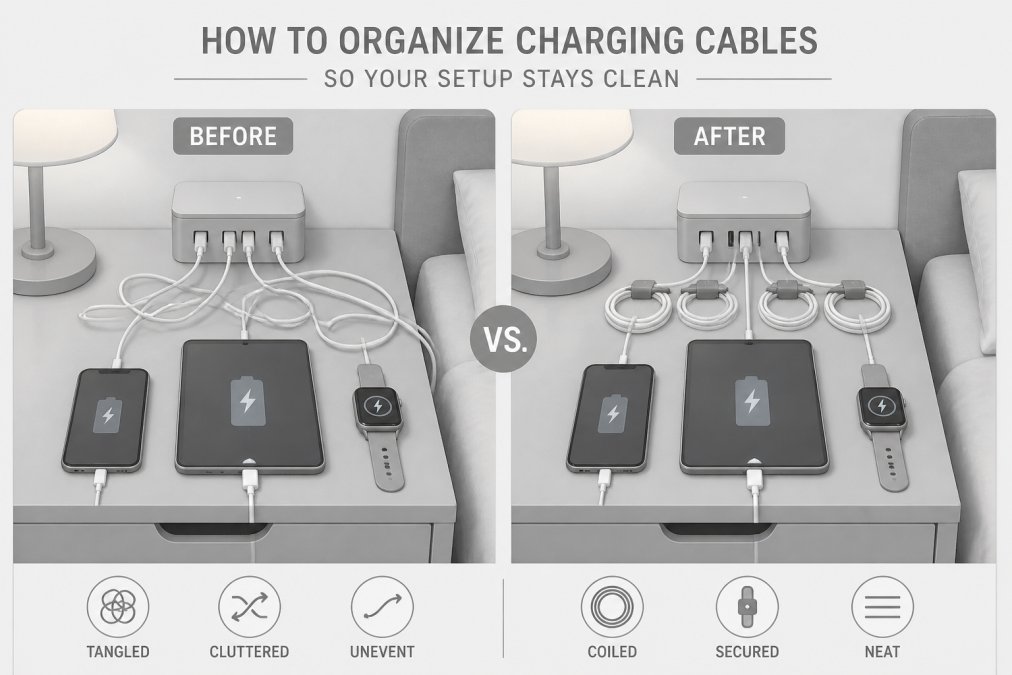
- Mount the station on a desk edge or nightstand to free surface space
- Use a cable organizer box to hide the power brick and excess length
- Keep one spare USB-C cable coiled in a drawer for travel
Fast Charging Station for Multiple Devices: What It Takes to Hit Top Speed
A fast charging station for multiple devices needs three things working together: a port that supports USB-C Power Delivery (PD), enough total wattage to feed every device at once, and a cable rated for the current the port can push. Miss one and speed drops to the weakest link.
How USB-C Power Delivery Actually Negotiates Speed
PD is not a single speed, it is a negotiation. When you plug in a device, the charger and device talk over the USB-C configuration channel and agree on a voltage and amperage pair. Common PD tiers:
- 5V at 3A (15W), baseline for phones and small accessories
- 9V at 3A (27W), fast charge for many phones and tablets
- 15V at 3A (45W), mid-tier laptops and larger tablets
- 20V at 3A (60W), thin-and-light laptops
- 20V at 5A (100W), full-size laptops and 100W PD devices
- 28V, 36V, 48V tiers (up to 240W), newer PD 3.1 range for high-draw laptops and workstations
Why GaN Matters for Multi-Device Speed
Gallium nitride (GaN) semiconductors switch power faster and waste less energy as heat than legacy silicon, letting a deck-of-cards-sized station push 100W to 140W without a fan. For multi-device use, the benefit is headroom: a GaN station holds higher wattage across more ports before thermal throttling kicks in.
The Cable Is Half the Equation
A 100W station paired with a 60W cable caps at 60W. Cable ratings to check:
- 3A cables, good up to 60W
- 5A E-Marked cables, required for 100W and above
- Thunderbolt 3/4 or USB4 cables, 100W+ power plus high-speed data, useful if the same port carries video
What "Fast" Means Per Device Class
- Smartphones, 18W to 45W is the practical ceiling for most current models; beyond that, the phone itself limits draw
- Tablets, 20W to 45W depending on size
- Laptops, 45W for ultraportables, 65W to 100W for mainstream, 140W+ for performance models
- Earbuds, watches, trackers, 2.5W to 5W; a dedicated low-wattage port or wireless pad is ideal so they do not occupy a high-wattage slot
Simultaneous Draw: Where "Fast" Gets Complicated
When you plug a second device into a multi-port station, the station re-negotiates the power split. On a 65W station with one 45W laptop port and two 20W phone ports, plugging in all three does not give you 45 + 20 + 20 = 85W, the station caps at 65W total and redistributes. The laptop may drop to 30W, and the phones to 10W each.
Quick Reference: Port Count vs. Realistic Speed
| Ports in use | 65W station behavior | 100W+ GaN station behavior |
|---|---|---|
| 1 laptop | Full 45-65W to laptop | Full 65-100W to laptop |
| 1 laptop + 1 phone | Laptop drops to ~45W, phone gets ~18W | Laptop holds ~65W, phone gets ~20W |
| 1 laptop + 2 phones | Laptop drops to ~30W, phones split ~15W each | Laptop holds ~45-65W, phones split ~15-20W each |
| 3 phones + tablet | All ports throttle to ~10-15W each | Phones hold fast charge, tablet gets ~20W |
Numbers vary by station, but the pattern is consistent: total wattage is a shared budget, and every device you add competes for it.
Wireless Charging Pads and Charging Docks: Stand-Based vs. Flat Designs
Wireless charging pads trade speed for convenience. A Qi-certified pad tops out well below wired fast charging, but it eliminates the nightly hunt for a cable.
Battery Health, Thermal Management, and Charging Conflicts
Most buying guides stop at speed. The question they skip is what a high-wattage multi-device station does to your batteries over two or three years, and what to do when several devices fight for power at once.
How Charging Actually Affects Lithium-Ion Battery Health
Lithium-ion batteries age on two axes: cycle count and heat exposure. A charging station influences the second far more than the first.
- Heat is the dominant factor. Battery researchers and device manufacturers consistently find that sustained charging above roughly 95°F (35°C) accelerates capacity loss. A station that runs cool and vents well protects your devices; one crammed into a closed drawer or stacked under papers traps heat and shortens battery life.
- Fast charging itself is not the villain. Modern phones and laptops manage their own charge curves. They pull high wattage when the battery is low and taper to a trickle above roughly 80% state of charge. A 100W port does not force 100W into a phone that only wants 18W, the device requests what it can safely accept.
- Overnight charging is fine on quality hardware. Once a device hits full, it stops drawing meaningful current. The risk is not the hours plugged in; it is the heat the station and device generate during those hours.
Thermal Management Features Worth Checking
When you compare stations, look for these on the spec sheet or in the manual:
- Over-temperature protection (OTP), the station shuts down or reduces output if internal temperature crosses a threshold
- Over-current protection (OCP), caps current if a device or cable misbehaves
- Over-voltage protection (OVP), guards against wall-side voltage spikes
- Surge protection, clamps transient spikes from the outlet; rated in joules on better units
- Ventilation design, metal housings and vented cases dissipate heat better than sealed plastic
Charging Conflicts: What Happens When Everyone Plugs In at Once
A charging conflict happens when the station's total output budget is smaller than the sum of what every connected device is asking for. The station does not fail, it redistributes, and every device slows down.
Common symptoms:
- A laptop that charged at full speed alone now shows "slow charger" or trickle-charges when phones are added
- Phones that normally fast-charge drop to standard 5V charging
- A wireless pad stops charging entirely when a wired laptop is plugged in
- The station gets noticeably warmer under multi-device load
A Troubleshooting Sequence That Actually Works
- Unplug the heaviest device first. If the remaining devices speed up, the station is underpowered for your combined load, not defective.
- Check the port labels. Most multi-port stations designate one or two high-wattage ports. Move the laptop to the highest-rated port and the phones to the secondary ports.
- Swap the cable on the slow device. A 3A cable caps a 100W port at 60W; a damaged cable can cap it far lower.
- Test each device alone. If a device is slow even when it is the only thing plugged in, the issue is the device or the cable, not the station.
- Check the wall outlet. A station on a shared circuit with a space heater or a high-draw appliance may be browning out. Move it to a dedicated outlet.
- Confirm the station's per-port spec. Many stations advertise total wattage but deliver less per port when multiple ports are active. The manual's power-distribution table is the authoritative source.
Matching Station Size to Your Real Load
A practical rule: add up the peak wattage of every device you expect to charge simultaneously, then buy a station rated at least 30% above that total. A household charging one 65W laptop, two 20W phones, and a 5W watch is asking for roughly 110W, a 140W GaN station handles it without throttling, while a 100W station squeezes the laptop.
A Note on Wireless and Heat
Wireless charging is less efficient than wired, more energy becomes heat at the coil. That is fine for overnight top-ups, but stacking a phone on a wireless pad while running a laptop and tablet on the same station concentrates heat in one small area. If a phone gets warm on a wireless pad, move it to a wired port for that session.
Frequently Asked Questions
How many watts do I need for a multi-device charging station?
Add up the wattage each device needs, then leave headroom. A laptop alone may pull 60W to 100W over USB-C Power Delivery, while phones and tablets typically draw 18W to 30W each. For two laptops plus two phones, look for a 100W to 140W total output with intelligent power allocation so wattage shifts to whichever port needs it. Check the per-port rating, not just the total, because output distribution decides real charging speed.
Do multi-device charging stations support fast charging?
Many do, but only on specific ports. Look for USB-C Power Delivery (PD) and Qualcomm Quick Charge labels, plus a per-port rating that matches your device's maximum. A station advertised at 65W total may split that across six ports, leaving each device with a slow trickle. GaN technology helps here because it packs higher wattage into a smaller power brick without the heat of older silicon designs.
Are wireless charging stations safe for all devices?
Qi-certified wireless charging pads are safe for any Qi-compatible phone or earbuds case, and they cut the wear that comes from plugging and unplugging cables daily. The catch is speed: wireless charging usually runs slower than a wired USB-C connection, and thick cases can block the coil. If you want the fastest top-up for a laptop, keep a wired port free and reserve the wireless pad for phones and accessories.
What should I look for when buying a multi-device charging station?
Start with total wattage output and port density, then check fast charging protocols, surge protection, and over-current protection. A compact footprint and thermal management matter if the station sits on a nightstand or desk. If you travel, a foldable travel adapter or charging dock with interchangeable cables saves space. Finally, think about cable management: built-in clips or a charging station base keep the desktop organizer look instead of a tangle.
Picking the right station comes down to matching wattage and ports to your actual devices, then keeping the setup tidy so it stays useful. At 0ne Less Thing and Apparel, we stock practical charging solutions and home gadgets built to simplify daily routines, from multi-port stations to cable organizers that keep desks and nightstands clear. Browse the collection to find a charging setup that fits your devices and your space, and let one less tangled cable be one less thing to worry about.