

Best Desk Posture Tools for Back Pain Relief
Table of Contents
- Quick Comparison: Best Desk Posture Tools
- Does a Posture Corrector Help Back Pain?
- Best Desk Posture Tools for Back Pain: Braces, Bands, and Supports
- Ergonomic Desk Setup for Back Pain: What to Adjust First
- How Long to Wear a Posture Corrector (and When to Take It Off)
- Beyond Braces: Recovery Tools That Support Better Posture
- Common Mistakes That Keep Desk Workers in Pain
- Conclusion
- Frequently Asked Questions
Last Updated: October 2, 2026
Quick Comparison: Best Desk Posture Tools
The best desk posture tools for back pain hold your shoulders and spine in neutral alignment while you sit. This guide from 0ne Less Thing and Apparel covers what works, what to skip, and how to wear each tool without making your muscles dependent on it.
| Tool | Price | Support Type | Best For | Wear Time |
|---|---|---|---|---|
| Posture Corrector | $9.93 | Full upper-back support | All-day desk work, rounded shoulders | 20-30 min to start, build up |
| Back Posture Corrector Band | $7.02 | Breathable, discreet band | Long sitting sessions, under clothing | 20-30 min to start, build up |
| Ergonomic setup changes | Varies | Environmental | Everyone, every day | Permanent |
Does a Posture Corrector Help Back Pain?
A posture corrector can help back pain by supporting the shoulder girdle and reminding you to hold neutral alignment, but it works as a training tool, not a cure. Physical therapists call it a cue, not a crutch: useful for building postural awareness, unhelpful if you never take it off.


How a Posture Corrector Actually Works
A corrector does not "fix" your spine. It changes the sensory input your brain receives while you wear it, through three mechanisms:
- Proprioceptive feedback. A brace adds a gentle pull across the shoulders and upper back, sharpening the signal so you feel the moment you start to slump.
- Scapular retraction. The straps draw your shoulder blades back and down, opening the chest and putting your thoracic spine into slight extension, the opposite of the rounded, forward-head position most desk workers default to.
- Load redistribution. Holding the shoulder girdle in a supported position temporarily offloads the upper-back and neck muscles that fight gravity all day, which is why short wears often feel relieving.
What the Research Says About Posture Braces
Research on posture braces is mixed and modest: studies show short-term relief and improved postural awareness while wearing one, with weaker evidence for lasting change once you stop. That is not a reason to avoid them, but a reason to pair them with movement, strengthening, and an ergonomic workstation that does not fight you all day.
When a Corrector Is the Right Tool (and When It Is Not)
Use a corrector when you need a physical reminder during long sitting blocks, when recovering from a strain and wanting light orthopedic support, or when retraining a rounded-shoulder habit. Skip it as a permanent solution, for sleep, and for an undiagnosed spine condition until a clinician clears you.
The Over-Reliance Problem Most Guides Skip
The biggest risk with any posture support device is wearing it as a substitute for movement. Strap on a brace at 9 a.m., leave it on until 5 p.m., and never stand up, and over weeks the postural muscles get less stimulus, not more, the brace becomes load-bearing.
Best Desk Posture Tools for Back Pain: Braces, Bands, and Supports
The two support devices worth considering are a full upper-back corrector and a breathable correction band. Both pull your shoulder girdle back into alignment and give your postural muscles a reference point to copy.
Posture Corrector: Full Upper-Back Support for $9.93
Our top pick for most desk workers is the Posture Corrector at $9.93. It gently aligns the spine and supports the upper back, exactly the region that collapses when you hunch over a keyboard.
Back Posture Corrector Band: Breathable, Discreet Support for $7.02
If you run hot or want something you can forget you're wearing, the Back Posture Corrector Band at $7.02 is the better fit. It uses a breathable, invisible design with an ergonomic ribbon orthotics structure and adjustable fit, in sizes S to XXXL across several styles for men and women.
Ergonomic Desk Setup for Back Pain: What to Adjust First
Fix your setup before you buy a brace. An ergonomic desk setup for back pain starts with three adjustments: chair height, monitor position, and keyboard placement. Get those right and the brace becomes a supplement, not a substitute.
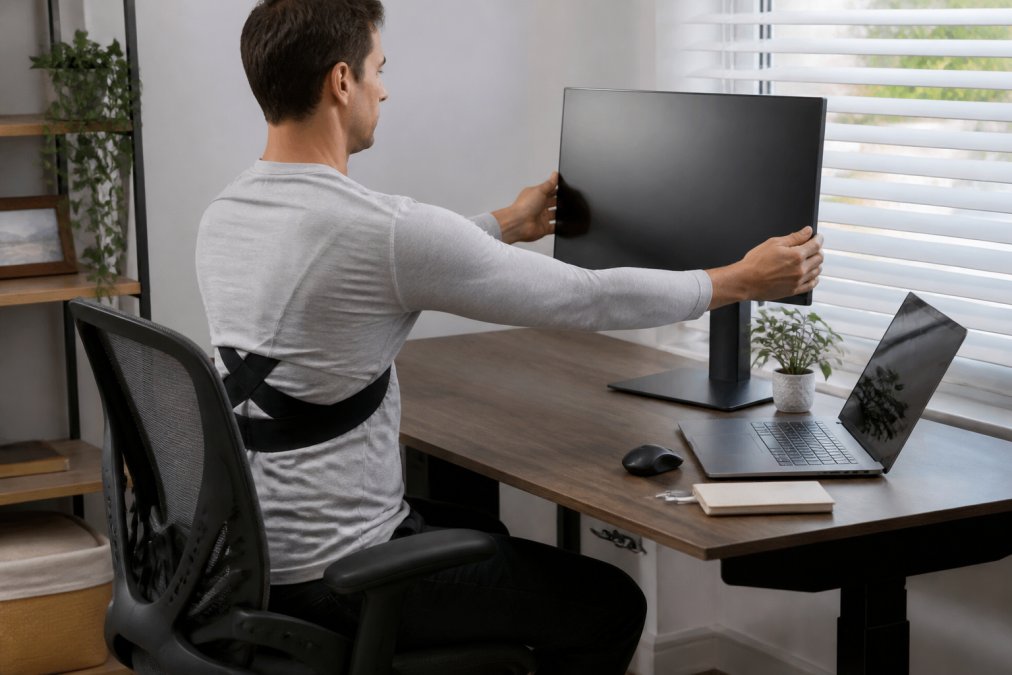
Chair, Monitor, and Keyboard: The Three-Point Check
Run this check once a week. It takes two minutes and prevents most of the slow drift into pain.
- Chair height: feet flat on the floor, knees level with or slightly below hips
- Lumbar support: the chair's curve sits in your lower back, not above it
- Monitor top: at or just below eye level, an arm's length away
- Keyboard: elbows at roughly 90 degrees, wrists straight, not bent up
- Screen and keyboard: centered so you're not twisting to one side
How Long to Wear a Posture Corrector (and When to Take It Off)
Start at 20 to 30 minutes per session and add roughly 10 minutes every few days as your muscles adapt. Most desk workers land at 1 to 2 hours per day, split into blocks, and stop well before the brace becomes a permanent fixture.
A Work-From-Home Wear Schedule That Actually Holds Up
Without a commute, walking meetings, or a coworker stopping by, the work-from-home day has almost no built-in movement, which makes the wear schedule more important, not less. A pattern that works for most desk workers:
| Time Block | Wear State | What You're Doing |
|---|---|---|
| 9:00-9:30 a.m. | On | First focused work block, brace cues alignment |
| 9:30-11:30 a.m. | Off | Stand, walk, refill water, sit upright unaided |
| 11:30 a.m.-12:00 p.m. | On | Second cue block before lunch |
| 12:00-2:00 p.m. | Off | Lunch, movement, errands |
| 2:00-2:30 p.m. | On | Afternoon cue block |
| 2:30-5:00 p.m. | Off | Finish the day without the brace |
Pairing the Brace With a Standing Desk or Ergonomic Chair
Most guides treat posture tools and ergonomic furniture as separate purchases. They work better together.
- Standing desk. Do not wear a full corrector while standing for long stretches, standing already recruits your postural chain, and the brace can mask sloppy standing mechanics. Use it during seated blocks, then stand without it. Alternate sit-stand every 30 minutes and the brace naturally comes on and off with the desk.
- Ergonomic chair with lumbar support. Set the lumbar curve into your lower back first, then put the brace on. If the brace is doing the chair's job, the chair is set too low or too far back.
- Monitor and keyboard. A brace cannot outwork a monitor below eye level. Raise it to eye level and bring the keyboard close enough that your elbows rest near 90 degrees; the brace then reinforces a position your setup already supports.
Skin, Fit, and the Signs It's Time to Remove It
Breathable bands reduce heat, but any device worn against skin for hours can irritate. A few habits prevent most of it:
- Wear the brace over a thin t-shirt rather than directly on skin during long sessions.
- Wash the band by hand with mild soap and let it air dry; skip the dryer, which degrades the elastic.
- Check the tension every time you put it on. A brace that digs in is doing more harm than a brace that feels almost too loose.
Signs it's time to remove it:
- You feel pressure or numbness anywhere along the band
- You've worn it through a full workday without a break
- Your back feels stiff rather than supported when you stand up
- You're using it during sleep or heavy lifting
- Your skin is red, warm, or itchy under the strap
Beyond Braces: Recovery Tools That Support Better Posture
Support devices hold a position. Recovery tools loosen the tissue that keeps pulling you out of it. If your chest and hip flexors stay tight, no brace will hold your shoulders back for long.
Two more options worth knowing about:
- The Electric Heating Pad & Massager at $16.38 offers adjustable heat therapy in a flexible, wearable belt. It's built for abdominal cramp relief, so it's a comfort tool rather than a back-specific device.
- The Rechargeable Foot Massage Pad at $5.49 uses vibration modes to ease foot fatigue. Desk workers who sit with tense, curled feet often find that loosening the base of the body changes how the whole chain feels.
Common Mistakes That Keep Desk Workers in Pain
The biggest mistake is treating a brace as the whole solution. The second is ignoring the work-from-home routine problem: no commute, no walking meetings, no reason to stand up. At home, build movement into the day on purpose.

Other mistakes I see repeatedly:
- Wearing the corrector all day, every day, then wondering why the pain returns the moment it comes off
- Setting up the desk once and never rechecking it as the chair sinks or the monitor gets nudged
- Skipping shoulder retraction and core engagement exercises entirely, which are what actually build the muscles a brace is cueing
- Buying a device and never adjusting the tension, so it either does nothing or digs in
- Ignoring muscle fatigue signals and pushing through a long sitting block instead of standing up
Conclusion
The hard part isn't finding a support device. It's building a routine where the device, your setup, and your movement habits all pull in the same direction. Most people buy a brace, wear it for a week, and never fix the desk underneath it.
Frequently Asked Questions
Do posture correctors actually help with back pain?
A posture corrector can help by gently aligning your spine and supporting your muscles, which may relieve strain from long hours at a desk. The Posture Corrector from 0ne Less Thing and Apparel is designed to promote proper alignment and reduce neck and shoulder stiffness. However, a corrector works best as one part of a broader routine that includes ergonomic adjustments and regular movement breaks.
What is the best way to fix posture while sitting at a desk?
Start with your setup: raise your monitor so the top of the screen is at eye level, keep your feet flat on the floor, and position your keyboard so your elbows rest near 90 degrees. Then add postural awareness habits like shoulder retraction every 30 minutes. An ergonomic desk setup for back pain works best when combined with a support tool such as the Back Posture Corrector Band, which offers discreet, breathable support during long sitting sessions.
Are posture correctors recommended by physical therapists?
Many physical therapists view posture correctors as a short-term training aid rather than a permanent fix. They can help build postural awareness and provide tension relief while you strengthen your core and back muscles through exercise. The key is not to rely on a brace all day. Use it for focused periods, pair it with physical therapy or stretching, and gradually reduce wear as your muscles adapt.
How long should you wear a posture corrector per day?
Start with 15 to 20 minutes per day and gradually build up to 1 to 2 hours. Wearing a corrector longer than that can lead to muscle fatigue and over-reliance, which may weaken your back muscles over time. The goal is posture training, not permanent support. Take it off during breaks, exercise, and sleep, and focus on building core engagement and body mechanics that last without the brace.
What ergonomic tools are essential for a home office setup?
The essentials are an adjustable chair with lumbar support, a monitor riser or stand, and an external keyboard and mouse to keep your wrists neutral. Add a footrest if your chair does not adjust low enough. For extra relief during long sessions, a neck pillow like the SkySoothe or a deep tissue massage tool can help ease muscle tension. Start with the big three, then add comfort accessories as needed.